Presentation Template - Luscious: Elevating Visual Storytelling for Modern Creators
In a digital landscape saturated with generic slide decks and cookie-cutter corporate aesthetics, standing out requires more than just good data; it demands a distinct visual identity. The Presentation Template - Luscious arrives as a direct response to this need for aesthetic sophistication without sacrificing functionality. Designed for versatility, this template bridges the gap between high-end design agencies and practical business communication. It is not merely a collection of slides but a comprehensive visual system that allows users to craft narratives that feel curated, intentional, and professionally polished.
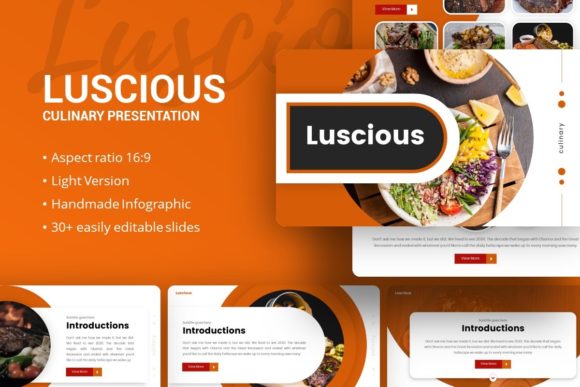
For professionals aged 20 to 50 who manage their own branding or client deliverables, time is often the scarcest resource. You might have the content strategy locked down, but spending forty hours designing custom infographics in PowerPoint is rarely feasible. This is where the Luscious template shifts from being a simple asset to a productivity tool. By providing 35 pre-designed slides based on master layouts, it eliminates the friction of starting from a blank canvas while ensuring that every element, from typography to spacing, adheres to a cohesive design language.
Real-World Applications Across Industries
The true value of any presentation asset lies in its adaptability. While many templates claim to be multipurpose, they often lean too heavily into one specific niche, making them awkward for other uses. Presentation Template - Luscious maintains a balanced aesthetic that serves diverse scenarios effectively.
Creative Agencies and Portfolios
For freelancers and agency owners, your pitch deck is an extension of your portfolio. If you are selling design, photography, or marketing services, a cluttered or outdated slide deck undermines your expertise before you even speak. The pixel-perfect illustrations and handcrafted infographics included in this template allow creatives to showcase case studies with the same level of polish they apply to client work. The picture placeholders are designed with drag-and-drop functionality, meaning a photographer can swap in their latest campaign shots in seconds without breaking the layout’s aspect ratio or alignment. This ensures the focus remains on the creative work rather than the formatting struggles.
Startup Pitch Decks and Investor Relations
Entrepreneurs face the unique challenge of explaining complex business models quickly. Investors review dozens of decks weekly, and visual fatigue is real. The Luscious template offers structured layouts specifically suited for problem-solution narratives, market sizing, and team introductions. Because the graphics are fully resizable and editable vectors, a startup founder can adjust charts to reflect updated traction metrics without needing to hire a graphic designer for every iteration. The clean, modern aesthetic signals professionalism and attention to detail, traits that investors associate with operational competence.
Corporate Profiles and Internal Reporting
Even within established corporations, internal communications often suffer from "death by PowerPoint." Department heads and managers can use this template to transform dry quarterly reports or training materials into engaging visual summaries. The master slide architecture ensures that even if multiple team members contribute different sections, the final output looks unified. This consistency is crucial for maintaining brand integrity across large organizations where disparate teams might otherwise create fragmented visual experiences.
Technical Features That Drive Practical Outcomes
Beyond aesthetics, the utility of Presentation Template - Luscious is rooted in its technical construction. Understanding these features helps users maximize their return on investment and avoid common pitfalls associated with premium templates.
- Master Slide Architecture: Rather than formatting individual slides, changes made to the master slide propagate throughout the deck. This is essential for rebranding projects or updating color schemes globally in minutes rather than hours.
- Vector-Based Infographics: Raster images pixelate when projected on large screens or zoomed in during virtual meetings. The handcrafted infographics in this template are vector-based, ensuring crisp clarity at any resolution. This is particularly important for data-heavy presentations where legibility is non-negotiable.
- Editable Picture Placeholders: The drag-and-drop image frames prevent the common issue of stretched or cropped photos. Users simply drop their media into the designated area, and the template handles the masking and sizing automatically.
- Comprehensive Documentation: A dedicated documentation file is included to guide users through customization. This reduces the learning curve for those less familiar with advanced PowerPoint features, making professional design accessible to non-designers.
Strategic Considerations Before Implementation
While Presentation Template - Luscious is a powerful tool, successful implementation requires mindful preparation. Prospective users should consider several factors to ensure the template aligns with their specific needs and technical environment.
First, assess your content volume against the 35-slide structure. While the slides are customizable, forcing too much text into a visually driven layout defeats the purpose. This template works best for presenters willing to distill their message into concise, impactful points supported by visuals. If your goal is to provide a dense textual reference document, a Word processor or PDF report may be more appropriate. Use this template when engagement and retention are the primary objectives.
Second, verify software compatibility. The template is provided as a .PPTX file, which is the industry standard for modern PowerPoint versions. However, users relying on older legacy versions of Office or alternative suite software like Keynote or Google Slides should test the file immediately after download. While most elements transfer well, complex master slide relationships or specific vector effects can sometimes behave differently across platforms. Having a backup plan or access to a compatible version of PowerPoint ensures you aren't caught off guard before a deadline.
Third, understand the licensing and asset inclusion. As noted in the product details, demo images are for preview purposes only and are not included in the downloadable files. This is standard practice, but it means you must have your own high-quality imagery ready. Using low-resolution or watermarked stock photos will degrade the perceived quality of the template. Budget time for sourcing or creating appropriate visuals that match the "Luscious" aesthetic—think high contrast, clean lines, and professional lighting.
Maximizing Impact Through Customization
To truly own the presentation, users should move beyond simple text replacement. The handcrafted nature of the infographics invites modification. For example, a marketing team presenting social media analytics could recolor the vector charts to match specific platform brand colors, creating an immediate subconscious association for the audience. Similarly, educators or trainers can simplify complex diagrams by removing unnecessary layers within the editable vector objects, tailoring the information density to their students' level.
The 35-slide count provides ample variety without overwhelming choice. A practical workflow involves selecting five to seven core layouts that fit your narrative arc and hiding the unused slides. This keeps your workspace organized and prevents accidental formatting inconsistencies. By treating the template as a modular kit rather than a rigid sequence, you maintain creative control while benefiting from professional design infrastructure.
Ultimately, Presentation Template - Luscious serves as a force multiplier for communicators. It democratizes access to high-tier design, allowing a solo freelancer to present with the visual weight of a boutique agency, and enabling corporate teams to communicate with renewed clarity. Whether you are pitching a new venture, showcasing a photography portfolio, or restructuring a company profile, the template provides the structural and aesthetic foundation necessary to turn information into influence. By focusing on how these tools integrate into actual workflows rather than just listing specifications, users can leverage this resource to save time, enhance credibility, and deliver messages that resonate long after the screen goes dark.