Presentation Template - Lunchette: A Versatile Design Tool
Finding the right balance between professional polish and creative warmth in a slide deck can be challenging. Many templates feel too rigid for creative portfolios yet too casual for business proposals. Presentation Template - Lunchette bridges this gap by offering a design aesthetic that is fresh, culinary-inspired, and surprisingly adaptable to non-food industries. While the name suggests a focus on gastronomy, the underlying structure supports a wide array of professional needs, from startup pitch decks to personal photography portfolios.
At its core, this template is a comprehensive PowerPoint (.PPTX) toolkit designed to streamline the creation process without sacrificing visual quality. It provides a cohesive visual language that communicates attention to detail. For users who need to present ideas clearly but want to avoid the sterile look of standard corporate themes, Lunchette offers a handcrafted alternative that feels human and approachable while maintaining high standards of readability and organization.
Core Features That Simplify Slide Creation
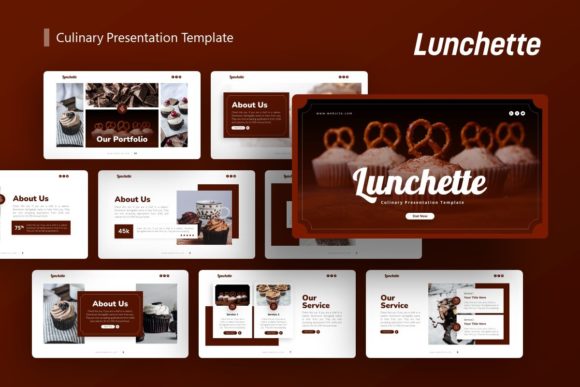
The technical specifications of a template often determine whether it becomes a long-term asset or a one-time use item. Presentation Template - Lunchette includes 36 unique slides per template variation, providing enough diversity to handle complex narratives without forcing repetitive layouts. This volume allows you to mix data-heavy slides with visual storytelling elements seamlessly.
A standout feature for many users is the inclusion of handcrafted infographics built directly within PowerPoint. Unlike static images imported from external software, these graphics are native vector shapes. This means you can resize, recolor, and edit every element of the chart or diagram to match your specific branding or data set. Because the template is based on Master Slides, global changes to fonts, colors, or logos apply across the entire deck instantly. This architecture saves hours of manual formatting and ensures consistency, which is crucial for maintaining brand identity in corporate profiles or agency pitches.
For those who are not professional designers, the drag-and-drop picture placeholders are invaluable. These smart objects allow you to swap preview images with your own content while automatically maintaining aspect ratios and masking effects. The pixel-perfect illustrations included in the file add a layer of bespoke artistry that elevates the presentation above generic stock-photo-heavy decks.
Adapting Culinary Aesthetics for Diverse Industries
It is natural to assume a template named "Lunchette" is exclusively for restaurants or food bloggers. However, the design principles used here—clean lines, appetizing color palettes, and organized grids—are universally effective for communication. Understanding how to repurpose this aesthetic is key to maximizing its value.
Creative Agencies and Portfolios
Creative professionals often struggle to find templates that reflect their artistic sensibility without looking messy. The grid-based layouts in Lunchette work exceptionally well for showcasing photography, graphic design work, or architectural projects. The ample whitespace acts as a gallery wall, allowing your work to breathe. For a personal portfolio, the softer color tones create an inviting atmosphere that encourages potential clients or employers to engage with your story rather than feeling overwhelmed by aggressive corporate styling.
Startups and Pitch Decks
In the startup world, standing out is essential. Investors see hundreds of identical blue-and-white slide decks. Using Presentation Template - Lunchette for a pitch deck signals creativity and differentiation. The infographic slides are particularly useful for explaining business models, market size, or user growth in a way that feels organic rather than clinical. If your startup operates in lifestyle, wellness, sustainability, or consumer goods sectors, this template aligns perfectly with your brand ethos.
Corporate and Business Profiles
Even traditional businesses can benefit from this template when the goal is internal engagement or client-facing education. For HR teams presenting company culture, or marketing teams launching a new lifestyle product, the warmer aesthetic fosters connection. The 36-slide variety ensures you have specific layouts for team introductions, timelines, SWOT analyses, and financial overviews, all wrapped in a unified, modern theme.
Practical Considerations Before You Begin
While Presentation Template - Lunchette is designed for ease of use, there are important practical details to understand before purchasing or downloading. Managing expectations regarding assets will prevent frustration during the editing process.
Image Licensing and Placeholders: It is critical to note that all images shown in the demo preview are for demonstration purposes only and are not included in the downloadable files. You must supply your own photography or source licensed stock images. The placeholders serve strictly as guides for composition. This is standard industry practice, but beginners should be prepared to have their visual assets ready before opening the file.
Software Compatibility: The file format is .PPTX, which is compatible with Microsoft PowerPoint 2010 and newer, as well as most modern alternatives like Keynote (with some potential formatting adjustments) and Google Slides. However, to fully utilize the Master Slide functionality and editable vector infographics, using the native Microsoft PowerPoint application is highly recommended. Some advanced animation or transition effects may not translate perfectly to web-based presentation tools.
Documentation and Support: The download includes a documentation file. Even if you are experienced with PowerPoint, reviewing this guide is advisable. It often contains specific instructions on how to manipulate the custom infographics or access hidden master layouts that aren't immediately obvious in the standard slide sorter view. Taking ten minutes to read the documentation can save hours of trial and error.
Maximizing Value Through Customization
To truly make Presentation Template - Lunchette your own, go beyond simply replacing text and images. Leverage the editable nature of the vector icons and graphics. If the default color palette doesn't match your brand guidelines, use the "Design > Variants > Colors" menu in PowerPoint to create a custom theme color set. This will update all handcrafted infographics and accents simultaneously.
Consider the narrative flow when selecting from the 36 available slides. You do not need to use them all. Curate a selection that best supports your specific message. For a photography portfolio, you might prioritize full-bleed image slides and minimal text layouts. For a business proposal, you might lean heavily on the timeline, comparison, and data visualization slides. The versatility lies in your ability to mix and match these components to build a unique deck that serves your precise objective.
Ultimately, this template serves as a foundation. Its value comes from combining its professional structure with your unique content. Whether you are pitching a new restaurant concept, displaying a year's worth of travel photography, or reporting quarterly results for a lifestyle brand, Lunchette provides the polished vessel needed to deliver your message effectively. By understanding its features and respecting its licensing terms, you can transform a simple download into a powerful communication tool that resonates with your audience.