Presentation Template - Escapago: A Versatile Design Solution for Modern Storytelling
When you are staring at a blank slide deck with a deadline looming, the difference between a stressful night and a confident presentation often comes down to your starting point. Presentation Template - Escapago is designed specifically to bridge that gap, offering a comprehensive visual framework that adapts to professional needs without requiring advanced graphic design skills. At its core, this is a 36-slide PowerPoint system built on master slides, meaning global changes to fonts, colors, or logos happen instantly across the entire deck. However, its true value lies in how it functions as a chameleon for different industries, allowing users to pivot from a corporate quarterly review to a creative portfolio showcase without switching software or hiring a designer.
Elevating Corporate Profiles and Business Pitches
For business professionals and startup founders, the primary challenge is often translating complex data into a narrative that investors or stakeholders can actually digest. Escapago addresses this through handcrafted infographics that are fully editable within PowerPoint. Instead of importing static charts from Excel or Illustrator, you can modify data visualizations directly in the slide environment. This is particularly useful during pitch decks where questions from investors might require on-the-fly adjustments to financial projections or market sizing diagrams.
The template’s structure supports the specific flow required for company profiles. You aren't just filling in text boxes; you are utilizing pre-arranged layouts that guide the viewer’s eye through company history, team introductions, and service offerings. For a startup seeking seed funding, the ability to drag and drop high-quality image placeholders allows for rapid iteration. If an investor meeting shifts focus from product features to user acquisition, you can rearrange the narrative flow in minutes because the underlying master slides maintain visual consistency even when content blocks are moved or resized.
Creative Agencies and Portfolio Applications
Creative agencies and freelancers face a unique paradox: their presentation about work must be as visually compelling as the work itself, yet the deck shouldn't overshadow the portfolio pieces. Escapago strikes this balance by providing pixel-perfect illustrations and clean typography that act as a sophisticated frame rather than a distraction. Photographers and designers can utilize the extensive image placeholder system to create immersive visual galleries. Because all graphics are resizable and editable, a photographer can adjust layout ratios to accommodate both landscape and portrait orientations without breaking the grid system.
In agency pitches, the versatility of the 36 unique slides becomes a strategic asset. One section of the template might serve as a minimalist backdrop for high-resolution campaign photography, while another utilizes bold infographic elements to explain marketing ROI or project timelines. This duality allows creatives to present both the emotional impact of their work and the logical business case behind it within a single, cohesive file. The vector icons included in the package further enhance this flexibility, allowing users to customize iconography to match specific brand guidelines or campaign themes without losing resolution on large projection screens.
Practical Customization and Workflow Efficiency
The technical architecture of Presentation Template - Escapago is built for speed, which matters when you are collaborating with teams who may not be design-savvy. Since the file is a standard .PPTX, it integrates seamlessly into existing corporate workflows. There is no learning curve associated with new software like Keynote, Canva, or Adobe InDesign. Team members can open the documentation file, understand the master slide hierarchy, and begin populating content immediately. This democratizes the design process, allowing subject matter experts to input their own content directly into professionally formatted layouts rather than waiting for a designer to format their bullet points.
Customization goes beyond simple color swapping. Because the infographics and shapes are native PowerPoint objects, they remain fully vector-based. This means you can scale a diagram from a business card size to a billboard size without pixelation. For users preparing materials for both digital distribution and live events, this scalability ensures the presentation looks crisp regardless of the output medium. The drag-and-drop picture placeholders eliminate the tedious masking and cropping processes that typically consume hours of preparation time, streamlining the path from raw assets to polished slides.
Navigating Limitations and Best Practices
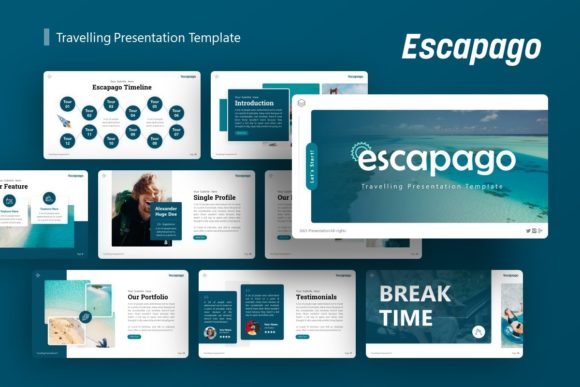
While Escapago provides a robust foundation, maximizing its effectiveness requires understanding what is included versus what is expected. It is crucial to note that all images shown in the demo preview are for display purposes only and are not included in the downloadable files. Users must have their own library of high-quality photography or access to stock resources to achieve the same level of polish seen in the marketing materials. Relying on low-resolution or poorly lit internal photos can undermine the premium feel of the template’s design.
Additionally, having 36 slides available does not mean you should use all of them. A common pitfall with comprehensive templates is the urge to fill every layout simply because it exists. Effective storytelling requires curation. Select only the slides that advance your specific narrative. If you are presenting a personal portfolio, perhaps only 15 of the 36 slides are relevant. The unused slides serve as a backup resource bank rather than a mandatory checklist. Furthermore, while the template is highly customizable, maintaining the integrity of the master slides prevents formatting drift. Users should resist the temptation to manually format individual text boxes outside the master parameters, as this breaks the global editing functionality that makes future updates efficient.
Choosing the Right Tool for Your Narrative
Determining if Presentation Template - Escapago is the right fit involves assessing your current pain points. If your struggle is purely content generation, a template will not solve writer's block. However, if your bottleneck is visual communication, layout consistency, or the time required to make professional-looking decks, this tool offers a direct solution. It is particularly valuable for organizations that need to maintain brand consistency across multiple departments without enforcing rigid, uneditable corporate templates that staff tend to avoid.
For solo entrepreneurs and freelancers, the investment in a premium template like Escapago often pays for itself after a single successful pitch or client presentation. The perceived value of a well-designed deck can influence pricing power and client confidence. By leveraging handcrafted infographics and professional layouts, independent professionals can signal a level of operational maturity that rivals larger agencies. Ultimately, the template serves as a silent partner in your presentation process, handling the heavy lifting of visual design so you can focus entirely on refining your message and connecting with your audience.