Presentation Template - Switch: A Versatile Design Tool
In the fast-paced world of professional communication, the difference between a mediocre pitch and a winning proposal often comes down to visual clarity. You might have groundbreaking data or a revolutionary creative concept, but if your slides look dated or cluttered, your audience disengages before you reach your second point. This is where the Presentation Template - Switch bridges the gap between content and design. It serves as a comprehensive visual framework designed specifically for professionals who need to communicate complex ideas without spending dozens of hours on graphic design.
Switch is not merely a collection of pretty backgrounds; it is a functional toolkit built on Master Slides. This distinction matters because it transforms PowerPoint from a frustrating drawing board into an efficient layout engine. Whether you are a startup founder seeking seed funding, a photographer showcasing a portfolio, or a corporate trainer explaining new compliance protocols, this template provides the structural integrity needed to maintain brand consistency while allowing for rapid customization.
Core Architecture and Customization Features
The primary strength of Presentation Template - Switch lies in its technical foundation. Many templates on the market are essentially static images pasted onto slides, making them nearly impossible to edit without breaking the layout. Switch takes a different approach by utilizing handcrafted infographics and pixel-perfect illustrations that are fully vector-based within PowerPoint. This means every chart, icon, and diagram can be resized, recolored, and reshaped directly in the software without losing quality or requiring external tools like Adobe Illustrator.
The template includes 36 distinct slides for each variation, providing enough variety to handle diverse narrative arcs without feeling repetitive. Because these are based on Master Slides, global changes are instantaneous. If you need to update your company logo or change the primary accent color across the entire deck, you can do so in one place rather than editing thirty individual slides. This architecture significantly reduces production time, allowing you to focus on refining your message rather than wrestling with alignment guides.
- Vector Icon Integration: Access to scalable icons ensures your visuals remain crisp on any display, from laptop screens to large conference projectors.
- Drag-and-Drop Placeholders: Image insertion is streamlined through smart placeholders that automatically crop and fit photos to the designated layout.
- Fully Editable Graphics: Charts and diagrams are native PowerPoint objects, meaning you can link them to Excel data or update figures manually with ease.
- Comprehensive Documentation: Included guides help users navigate the master slide structure, reducing the learning curve for those less familiar with advanced PowerPoint features.
Strategic Applications Across Industries
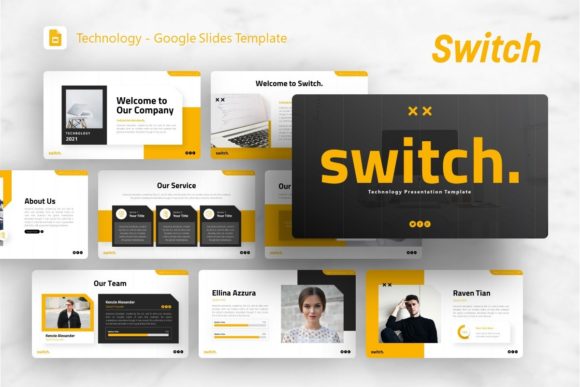
Versatility is the defining characteristic of Switch. While some templates are niche-specific, this system is engineered to adapt to multiple contexts. For creative agencies and freelancers, the template offers clean, modern layouts that let portfolio work take center stage without competing against heavy decorative elements. The minimalist aesthetic ensures that photography and design samples remain the focal point, while the typography and spacing provide a professional container that elevates the perceived value of the work.
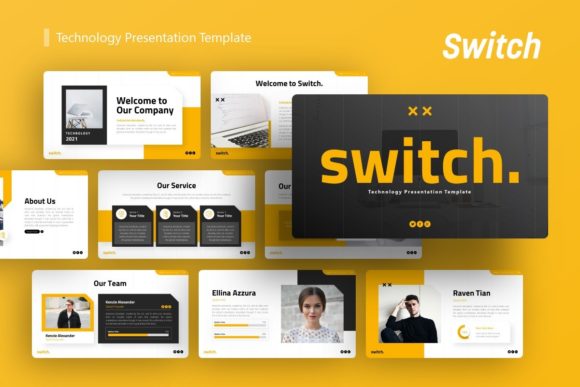
In the corporate and business sector, the utility shifts toward data visualization and structured storytelling. Pitch decks require a specific flow: problem, solution, market size, business model, and team. Switch provides dedicated slide types for each of these stages, including comparative charts, timeline infographics, and team profile grids. For startups, this structure is invaluable. Investors review hundreds of decks annually; using a polished, coherent template like Switch signals professionalism and attention to detail, subtly reinforcing the credibility of the business itself.
Educators and trainers also benefit from the template’s infographic capabilities. Complex processes or historical timelines can be visualized through pre-designed diagrams that break information into digestible chunks. Rather than presenting walls of text, instructors can use the visual hierarchy built into Switch to guide student attention and improve retention. The ability to easily swap out content while maintaining visual consistency helps create a cohesive learning experience across multiple lectures or modules.
Enhancing Communication Through Visual Consistency
Beyond aesthetics, using a unified system like Presentation Template - Switch supports better cognitive processing for your audience. When slide designs vary wildly from one to the next, viewers expend mental energy reorienting themselves instead of absorbing your message. Switch maintains consistent margins, font hierarchies, and color usage throughout the 36-slide library. This predictability creates a rhythm that allows the audience to anticipate where information will appear, making the presentation feel smoother and more authoritative.
Brand alignment is another critical factor. For businesses, every touchpoint is an opportunity to reinforce identity. Switch allows you to embed brand guidelines directly into the master slides. By setting your specific fonts, colors, and logo placement at the foundational level, you ensure that anyone on your team can create on-brand presentations without constant oversight. This democratizes design within organizations, enabling sales teams, HR departments, and executives to produce high-quality materials independently while maintaining strict visual standards.
Practical Considerations for Implementation
When integrating Switch into your workflow, there are several practical factors to keep in mind to maximize its value. First, understand what is included versus what is not. The files provided include the .PPTX file, documentation, and vector icons. However, all images shown in the demo are for preview purposes only and are not part of the download. This is standard practice, but it means you should have your own photography or stock image assets ready before beginning your build. Planning your visual assets in advance prevents bottlenecks during the design phase.
Second, leverage the documentation file. Even experienced PowerPoint users can benefit from reviewing the included guide, as it explains the specific logic behind the master slide setup. Understanding how the template author structured the layouts will save you time when creating custom variations. Instead of building new slides from scratch, you can duplicate and modify existing masters to maintain the underlying grid system and styling rules.
Finally, consider the context of your delivery environment. While Switch is optimized for standard widescreen formats, always test your presentation on the actual equipment you will be using. Colors can shift between monitors and projectors, and some animations may perform differently on older hardware. The resizable nature of the graphics in Switch makes it easy to adjust element sizes if you discover during a tech check that certain details are too small for the venue. Treat the template as a flexible starting point rather than a rigid constraint, and you will find it adapts readily to both digital sharing and live presentation scenarios.
Ultimately, Presentation Template - Switch represents a balance between creative freedom and structural discipline. It removes the technical barriers to good design while providing enough flexibility to serve unique communicative needs. By investing time in understanding its features and applying them thoughtfully, professionals across disciplines can transform their presentations from simple information delivery into compelling visual experiences that drive engagement and action.