Google Slides Template - Readyfest: A Versatile Design Asset for Modern Presentations
When you are staring at a blank slide deck with a deadline looming, the difference between panic and productivity often comes down to having the right starting point. The Google Slides Template - Readyfest serves as that critical bridge between raw data and visual storytelling. Rather than being a rigid framework locked into a single industry, this template functions as a modular design system. It provides a cohesive aesthetic foundation that adapts to the specific narrative you need to tell, whether that is securing venture capital, showcasing a photography portfolio, or outlining a quarterly business review.
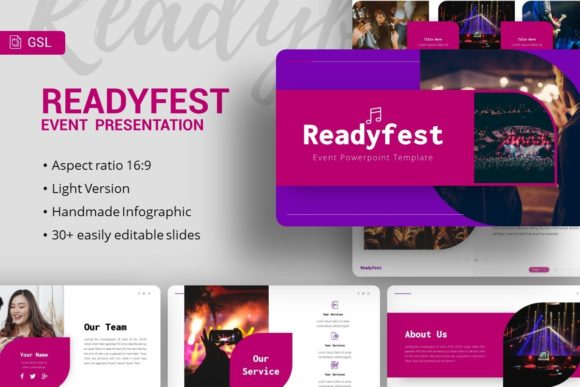
The core value of introducing the Readyfest Event Google Slides Template into your workflow lies in its flexibility. While many templates force your content into predetermined boxes, Readyfest offers 35 distinct slides based on master layouts. This structure allows you to maintain brand consistency without sacrificing creative freedom. For professionals aged 20 to 50 who juggle multiple roles—from startup founders to freelance creatives—this adaptability is not just a convenience; it is a necessity for maintaining professional standards across diverse projects.
Real-World Applications Across Industries
The true test of any presentation asset is how it performs outside the demo environment. Readyfest shines because it addresses specific pain points across different professional landscapes. Understanding these scenarios helps determine if this tool aligns with your current needs.
Startup Pitch Decks and Investor Relations
For entrepreneurs, the pitch deck is often the first impression made on potential investors. The Google Slides Template - Readyfest includes specialized layouts designed for this high-stakes environment. Startups can utilize the handcrafted infographic slides to visualize market size, user growth, or revenue projections without hiring a graphic designer. The pixel-perfect illustrations add a layer of polish that signals competence and attention to detail. When you are explaining a complex SaaS product or a new consumer app, having resizable, editable graphics means you can tailor the visual metaphor to your specific solution rather than relying on generic stock imagery that dilutes your message.
Creative Agencies and Portfolios
Creatives face a unique challenge: their presentation must be visually striking without overshadowing the work being showcased. Readyfest addresses this balance through clean picture placeholders and drag-and-drop functionality. A photography studio or digital agency can use this template to create a portfolio that feels curated rather than cluttered. The master slide architecture ensures that margins, typography, and color grading remain consistent from the title slide to the contact page. This consistency builds trust with prospective clients, demonstrating that the agency applies the same level of organizational rigor to their own branding as they would to a client’s campaign.
Corporate Profiles and Internal Reporting
In corporate environments, presentations often suffer from "death by PowerPoint." Teams frequently recycle outdated decks, leading to disjointed visuals and confusing data. Readyfest offers a refresh for company profiles and internal updates. Because all graphics are fully editable vector-based elements, marketing teams can update charts and diagrams to reflect current quarter metrics instantly. The documentation file included with the template reduces the learning curve, allowing non-designers within the organization to produce on-brand materials independently. This democratization of design saves time for creative teams while empowering department heads to communicate more effectively.
Navigating Customization and Technical Features
While the visual appeal of the Google Slides Template - Readyfest is immediate, its long-term utility depends on how easily it integrates into your existing workflow. The template is built on Master Slides, which is a significant technical advantage. Instead of formatting individual slides one by one, you can adjust global elements like fonts, colors, and logo placement across the entire deck simultaneously. This feature is particularly valuable when rebranding or adapting the template for different sub-brands under a parent company.
The inclusion of vector icons and resizable graphics further enhances practical usability. Raster images lose quality when scaled, but vectors remain crisp regardless of screen size or print resolution. For users presenting on large conference screens or exporting decks to PDF for email distribution, this ensures professional fidelity. However, it is important to note that while the template is highly customizable, it does require a basic understanding of slide masters to unlock its full potential. Users accustomed to simple drag-and-drop editing may need to consult the included documentation file to understand how to modify global styles efficiently.
Strategic Considerations Before Implementation
Adopting a new template should be a strategic decision rather than an impulsive download. There are several factors to weigh when considering Readyfest for your next project.
- Content Volume Alignment: With 35 unique slides, Readyfest is comprehensive. However, if your presentation requires only five slides, ensure you do not feel pressured to use extra layouts simply because they exist. Select only the slides that serve your narrative arc to keep the presentation focused and impactful.
- Image Asset Preparation: The demo images are for preview purposes only and are not included in the files. This is standard practice, but it means you must have your own high-quality assets ready before beginning. The picture placeholders are designed for specific aspect ratios; preparing your photography or screenshots to match these dimensions beforehand will streamline the build process significantly.
- Brand Compatibility: Evaluate whether the template’s underlying grid system complements your brand guidelines. While colors and fonts are changeable, the spatial arrangement is fixed. If your brand requires unconventional layouts or asymmetric grids that differ vastly from Readyfest’s structure, you may spend more time fighting the master slides than benefiting from them.
- Platform Versatility: Although marketed as a Google Slides template, the package includes a PowerPoint .PPTX file. This dual-format inclusion is crucial for teams working in mixed software environments. Verify which version renders your specific customizations best, as some advanced animations or font renderings may vary slightly between platforms.
Maximizing Value Through Intentional Design
The most successful users of the Google Slides Template - Readyfest treat it as a collaborative partner rather than a crutch. The handcrafted infographics provide a visual vocabulary, but the story remains yours. For example, a personal portfolio might use the timeline slide not just for employment history, but to map out a creative evolution or project milestones. A business might repurpose the team introduction slide to highlight key stakeholders in a change management initiative.
Practical experience suggests that the best results come from auditing the 35 slides before adding any content. Identify the layouts that naturally support your key messages. If you find yourself forcing text into a graphic-heavy slide, or cramming data into a minimalist layout, pause and reconsider. The template’s strength is in providing variety; leveraging that variety intentionally prevents the presentation from looking like a generic fill-in-the-blank exercise.
Furthermore, consider the longevity of the asset. Because Readyfest is based on master slides and includes editable vectors, it can serve as a reusable internal template for future quarters or campaigns. Investing time upfront to customize the master slides to your exact brand specifications transforms this purchase from a one-time solution into a sustainable design resource. This approach aligns with the needs of modern professionals who require tools that scale with their ambitions, offering both immediate relief for urgent deadlines and structural support for long-term communication strategies.