Evaluating Presentation Template - Artistry for Creative and Corporate Needs
Selecting the right visual framework for a presentation often involves balancing aesthetic appeal with functional utility. For professionals managing creative agencies, startup pitch decks, or personal portfolios, the Presentation Template - Artistry offers a distinct approach that bridges the gap between artistic expression and corporate structure. Unlike standard business templates that prioritize data density over design, or purely artistic layouts that sacrifice readability, this template aims to serve dual purposes. Understanding its specific architecture, feature set, and limitations is essential for determining whether it aligns with your current project requirements or if an alternative solution would be more effective.
Defining the Scope and Versatility of Artistry
The core value proposition of the Presentation Template - Artistry lies in its adaptability across multiple verticals. While many templates are niche-specific—designed exclusively for medical reports, financial quarterly reviews, or educational lectures—Artistry is engineered as a hybrid resource. It supports use cases ranging from Creative Agency showcases and Photography portfolios to Company Profiles and Startup Pitch Decks. This breadth is achieved through a modular design system rather than a rigid linear narrative.
For users evaluating this against single-purpose alternatives, the distinction is significant. A dedicated pitch deck template might include pre-formatted investor slides but lack the visual flair needed for a brand identity presentation. Conversely, a photography portfolio template may offer stunning image layouts but fail when tasked with displaying complex business infographics. Artistry attempts to solve this fragmentation by providing 35 unique slides per template variation. This volume allows users to mix and match content types without breaking visual consistency, making it a practical choice for organizations that need one master asset for diverse communication needs.
Technical Architecture and Customization Workflow
When comparing presentation resources, technical implementation is as critical as visual style. The Presentation Template - Artistry is built on Master Slides, a foundational PowerPoint feature that distinguishes professional-grade templates from basic theme packs. Master Slides allow global changes to fonts, colors, and logo placement to propagate instantly across selected slide layouts. For teams managing brand compliance, this reduces the risk of formatting errors and significantly accelerates the editing process.
The template includes several technical specifications that impact workflow efficiency:
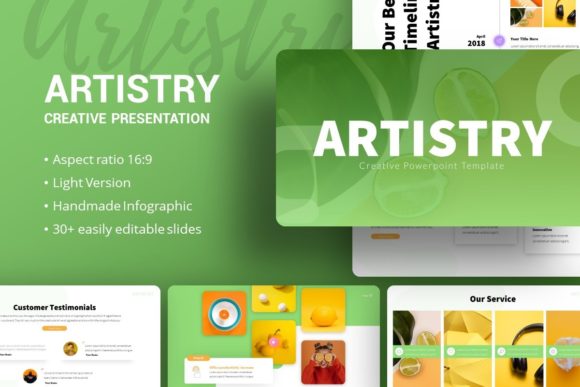
- Handcrafted Infographics: Rather than relying on generic SmartArt or external plugins, the graphics are native vector objects within PowerPoint. This ensures they remain editable and resizable without pixelation, a common issue when importing PNGs or JPEGs into slides.
- Picture Placeholders: The drag-and-drop functionality streamlines the replacement of demo imagery. Users can insert their own assets without manually cropping or masking, maintaining the intended aspect ratios and design balance.
- Vector Icon Integration: Included vector icons provide scalable visual cues that match the template’s aesthetic, eliminating the need to source third-party icon packs that may clash stylistically.
- Documentation File: Comprehensive guides reduce the learning curve, which is particularly valuable for users who are proficient in content creation but less experienced in advanced PowerPoint manipulation.
Compared to cloud-native presentation tools that rely on proprietary web formats, the .PPTX file format of Artistry ensures compatibility with existing enterprise ecosystems. However, this also means users must have access to Microsoft PowerPoint or a fully compatible editor; those strictly using browser-based tools may encounter rendering discrepancies with complex master slide arrangements.
Tradeoffs: Artistic Flexibility vs. Data Rigor
Every design choice involves tradeoffs. The Presentation Template - Artistry excels in visual storytelling and emotional engagement, making it ideal for introductions, brand narratives, and creative proposals. However, professionals in highly regulated or data-intensive fields should evaluate these strengths against potential limitations.
If your primary objective is to present dense financial tables, engineering schematics, or academic research with extensive citations, a minimalist corporate template or a specialized data visualization tool may be superior. Artistry’s emphasis on "pixel-perfect illustrations" and creative layouts means there is less negative space allocated for heavy text blocks. Attempting to force high-density information into these artistic frames can compromise legibility and undermine the template's design intent. In such scenarios, the template works best as a companion piece for executive summaries or introductory sections, while supplementary documents handle the granular data.
Comparative Analysis: When to Choose Artistry vs. Alternatives
Making an informed decision requires placing Presentation Template - Artistry within the broader landscape of available options. Below is a practical comparison framework based on common user priorities.
Visual Impact and Brand Alignment
If the goal is to differentiate a brand in a saturated market, Artistry holds a clear advantage over standard office themes. Its handcrafted nature provides a bespoke feel that generic templates cannot replicate. For creative agencies and personal portfolios, this aesthetic quality is not merely decorative; it serves as proof of competence. In contrast, free or low-cost template repositories often recycle similar layouts, making presentations feel derivative. If uniqueness is a key performance indicator for your deck, Artistry justifies the investment over free alternatives.
Editability and Time Investment
Time-to-completion is a critical metric for busy professionals. Templates based on Master Slides, like Artistry, generally offer faster customization than designs where every element is individually grouped on each slide. However, the learning curve for Master Slides can be steep for novice users. If you require a template that functions like a simple form-fill exercise with zero structural adjustment, a simpler, less robust option might yield faster results for one-off projects. Artistry is optimized for users willing to invest initial time in setup to gain long-term efficiency across multiple presentations.
Licensing and Asset Management
A crucial consideration noted in the product documentation is that all images in the demo are for preview purposes only and are not included in the files. This is standard industry practice due to licensing restrictions, but it impacts project planning. Users must budget time and resources for sourcing their own high-quality photography or illustrations. Alternatives that bundle stock photos may seem more convenient initially, but they often restrict commercial usage or limit resolution. With Artistry, you retain full control over asset licensing, ensuring your final presentation is legally compliant for commercial distribution, provided you source your own valid imagery.
Best-Fit Scenarios and Decision Factors
To determine if Presentation Template - Artistry is the correct resource for your specific situation, consider the following decision matrix:
- Audience Expectation: Is your audience expecting innovation, creativity, or visual sophistication? If yes, Artistry is a strong fit. If they expect strict adherence to traditional reporting standards, proceed with caution.
- Content Type: Does your content rely heavily on visuals, concepts, and narratives? The template’s 35 slides and infographic support are designed for this. If your content is 90% text and tables, look for text-heavy alternatives.
- Platform Compatibility: Do you primarily work in PowerPoint? The .PPTX format and vector elements are optimized for this environment. Cross-platform users should test compatibility before committing.
- Long-Term Utility: Will you need to create varied presentations (e.g., a pitch deck this month, a portfolio next quarter)? The versatility of Artistry offers better ROI for recurring needs compared to buying separate niche templates.
Practical Implementation Advice
For those who decide to adopt Presentation Template - Artistry, maximizing its value requires a strategic approach to customization. Begin by auditing the Master Slides to establish your brand palette and typography before touching individual slides. Utilize the included vector icons to create a consistent visual language throughout the deck. When replacing picture placeholders, select imagery that matches the mood and lighting of the original demo to preserve the template’s cohesive atmosphere. Finally, leverage the documentation file to understand any hidden features or shortcuts embedded by the designer.
Ultimately, the Presentation Template - Artistry represents a middle ground in the presentation ecosystem. It avoids the sterility of pure corporate templates while maintaining more structural integrity than abstract art projects. For adults aged 20–50 navigating the demands of modern professional communication, it offers a balanced toolkit for conveying ideas with both clarity and character. By understanding its specific strengths in visual storytelling and its limitations regarding data density, users can integrate it effectively into their workflow, ensuring their presentations resonate with audiences without sacrificing professional credibility.