Presentation Template - Trace: A Creative Design Tool
Creating a visually compelling slide deck often feels like a balancing act between aesthetic appeal and clear communication. For professionals, creatives, and entrepreneurs, the design of a presentation is just as important as the data it contains. This is where Presentation Template - Trace serves as a practical solution. It is a comprehensive PowerPoint resource designed to bridge the gap between high-end graphic design and everyday business communication. Rather than starting from a blank white slide, Trace provides a structured yet flexible foundation that allows users to convey complex ideas through polished, professional visuals without requiring advanced design skills.
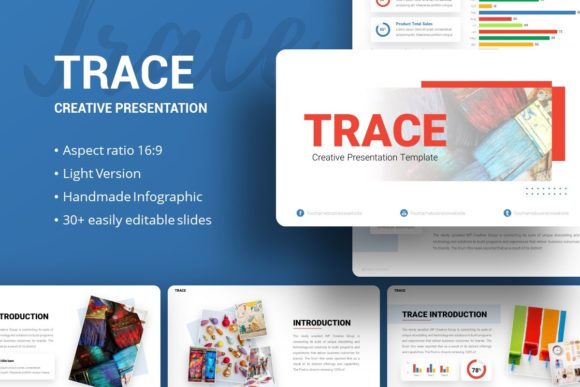
At its core, this template is built for versatility. While many slide decks are niche-specific, Trace is engineered to adapt to a wide spectrum of needs. Whether you are preparing a pitch deck for investors, showcasing a photography portfolio, or outlining a corporate strategy, the underlying structure supports diverse content types. The value lies in its ability to maintain visual consistency across 35 unique slides while remaining fully editable. This means you can change colors, fonts, and layouts to match your specific brand identity without breaking the design integrity of the file.
Core Features That Streamline Workflow
The technical specifications of Presentation Template - Trace are designed with the end-user’s workflow in mind. One of the most significant advantages is the use of Master Slides. In PowerPoint, master slides act as the blueprint for your entire deck. When you adjust an element on a master slide, such as a logo placement or a background color, that change propagates across every relevant slide automatically. This feature saves hours of manual formatting and ensures that your presentation remains pixel-perfect from start to finish.
Visual storytelling is another strong suit of this template. It includes handcrafted infographics that transform dry statistics into engaging visual narratives. These are not static images; they are native PowerPoint shapes and vectors. You can resize, recolor, and edit them directly within the software. This level of customization is crucial for maintaining accuracy. If your data changes five minutes before a meeting, you can update the infographic instantly without needing external design software. Additionally, the inclusion of vector icons adds a layer of professional polish that standard clip art simply cannot achieve.
For users who rely heavily on imagery, the drag-and-drop picture placeholders simplify the process of swapping out demo content for your own assets. This intuitive functionality removes the friction often associated with resizing and cropping images manually, allowing creators to focus on their message rather than alignment tools.
Practical Applications Across Industries
Understanding where and how to apply Presentation Template - Trace helps maximize its potential. Because it balances creativity with corporate professionalism, it fits naturally into several distinct contexts.
- Creative Agencies and Portfolios: For designers, photographers, and artists, the template offers a clean canvas that highlights work without distracting from it. The layout options allow for large imagery and minimal text, which is ideal for visual portfolios.
- Startups and Pitch Decks: Entrepreneurs need to communicate vision quickly. Trace provides dedicated slides for problem-solution frameworks, market analysis, and team introductions. The modern aesthetic signals innovation and competence to potential investors.
- Corporate Profiles and Business Reports: Established companies can use the template to modernize internal reporting or client-facing proposals. The structured layouts help organize dense information into digestible sections, improving audience retention.
- Personal Branding: Freelancers and consultants can utilize the personal portfolio slides to showcase case studies, testimonials, and service offerings. This elevates a simple resume or bio into a persuasive marketing tool.
Why Visual Consistency Matters for Beginners
For those new to presentation design, maintaining consistency is often the biggest challenge. Fonts might shift, colors may vary slightly between slides, and alignment can drift. Presentation Template - Trace solves this by enforcing a unified design language. When you download the .PPTX file, you are acquiring a system, not just a collection of slides. The included documentation file acts as a guide, helping beginners understand how to manipulate the template effectively. This educational aspect reduces the learning curve, making professional design accessible to educators, students, and small business owners who may not have a dedicated design team.
Furthermore, the psychological impact of a well-designed deck should not be underestimated. Audiences judge credibility based on visual cues. A disjointed or outdated presentation can undermine even the strongest verbal argument. By using a professionally crafted template, you borrow authority and trust, allowing your content to take center stage.
Important Considerations Before You Begin
While Presentation Template - Trace is a powerful asset, there are practical considerations to keep in mind to ensure a smooth experience. First and foremost, it is vital to understand licensing and asset inclusion. All images shown in the preview demos are for display purposes only and are not included in the downloadable files. Users must source their own photography or use royalty-free stock images. Planning your image assets ahead of time prevents last-minute scrambling when populating the picture placeholders.
Additionally, consider the scope of your project relative to the 35 available slides. Not every presentation requires all 35 layouts. It is often more effective to curate a selection of 10 to 15 slides that best support your narrative flow rather than forcing content into unnecessary templates just because they are available. Quality and relevance always trump quantity.
Technical compatibility is another factor. Ensure your version of PowerPoint supports the features used in the template, particularly regarding vector editing and master slide functionality. While .PPTX files are widely compatible, older versions of Office or alternative software like Keynote or Google Slides may interpret complex animations or fonts differently. Always test your final deck on the device you intend to present on to verify that all graphics remain resizable and editable as expected.
Maximizing the Value of Your Download
To get the most out of this creative presentation template, approach it as a modular toolkit. Save a copy of the original file as a backup before making any edits. Create a "master" version customized with your brand colors, logos, and preferred typography. This becomes your reusable base for future projects, significantly reducing setup time for subsequent presentations.
Remember that the handcrafted infographics are meant to be adapted. Do not feel constrained by the default arrangement. Mix and match elements from different slides to create custom layouts that serve your specific data visualization needs. The pixel-perfect illustrations provide a high-quality starting point, but your unique input is what transforms the template into a genuine communication asset.
Ultimately, Presentation Template - Trace is about empowerment. It democratizes high-quality design, enabling anyone from a hobbyist blogger to a corporate executive to produce stunning visual content. By leveraging its robust features, understanding its versatile applications, and respecting the necessary preparation steps, you can elevate your presentations from simple slideshows to impactful visual experiences. The goal is to spend less time wrestling with formatting and more time refining your message, ensuring that when you stand up to present, your audience sees exactly what you intend them to see.