Mosucity Presentation Template: Design for Impact
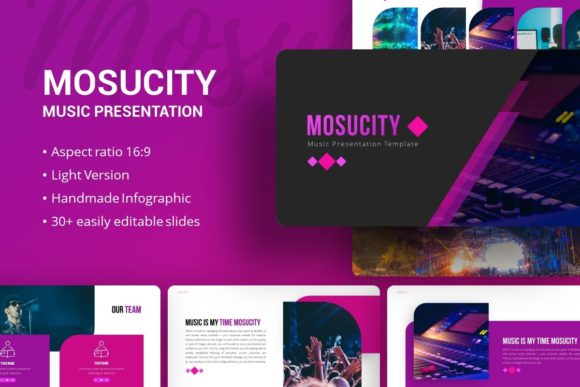
Great design is not merely about aesthetics; it is about communication efficiency. When you are preparing to pitch a startup, showcase a photography portfolio, or outline a corporate strategy, the structure of your deck matters as much as the content within it. The Presentation Template - Mosucity offers a sophisticated framework designed to bridge the gap between raw data and compelling storytelling. Rather than forcing your content into a rigid box, this template provides a flexible architecture that adapts to the rhythm of your narrative. It serves as a foundational tool for professionals who understand that clarity and visual engagement are inseparable partners in effective presentation.
Versatility Across Professional Disciplines
One of the primary strengths of the Mosucity template lies in its broad applicability without sacrificing specific relevance. A common pitfall with generic templates is that they feel too vague for specialized industries or too niche for general business use. Mosucity navigates this balance by offering 35 distinct slides that cater to diverse professional needs. For creative agencies and freelancers, the layout options emphasize visual hierarchy and whitespace, allowing portfolios to breathe. Conversely, for corporate entities and startups, the template includes structured layouts for financial projections, team introductions, and market analysis.
This adaptability means you are not starting from scratch every time you open PowerPoint. Whether you are an educator creating a lecture series or a marketer presenting quarterly results, the underlying grid system remains consistent while the surface-level styling shifts to match your intent. The template acts as a silent partner in your creative process, removing the friction of formatting so you can focus entirely on refining your message and connecting with your audience.
Mastering Visual Data Through Infographics
Data visualization is often where presentations fail. Complex information dumped onto a slide creates cognitive overload, causing audiences to disengage. Mosucity addresses this through handcrafted infographics built directly into PowerPoint. These are not static images imported from external software; they are native vector elements based on Master Slides. This distinction is critical for workflow efficiency. You can resize, recolor, and edit these graphics without losing resolution or spending hours in Adobe Illustrator.
Consider a scenario where you need to explain a multi-stage user journey or a comparative market analysis. Instead of using bullet points, you can utilize the template’s pre-designed flowcharts and comparison matrices. Because these elements are pixel-perfect and fully editable, you maintain brand consistency even when dealing with complex datasets. The ability to drag and drop content into picture placeholders further streamlines the process, ensuring that your visual evidence supports your verbal arguments seamlessly. This level of integration transforms dry statistics into digestible insights that resonate with stakeholders.
Strategic Applications for Different Audiences
The true value of a presentation asset is measured by how well it translates across different contexts. Mosucity is engineered to support various strategic goals, but maximizing its potential requires intentional adaptation. Below are practical approaches for leveraging this template based on specific user objectives.
- Startup Pitch Decks: Investors review hundreds of decks annually. To stand out, your narrative must be tight and visually confident. Use Mosucity’s bold typography slides for your value proposition and problem statement. Utilize the dedicated timeline and roadmap slides to demonstrate traction and future milestones. The clean aesthetic signals professionalism, while the structured layouts help you adhere to the standard pitch flow without looking templated.
- Creative Portfolios: For photographers, designers, and artists, the work itself is the hero. Select slides with minimal text areas and expansive image placeholders. Focus on full-bleed visuals and gallery grids that allow viewers to appreciate detail. Use the transition slides sparingly to create a cinematic pacing between projects, guiding the viewer through your creative evolution rather than just displaying a random assortment of images.
- Corporate Reporting: Internal and external business updates require trust and clarity. Leverage the template’s infographic suite to visualize KPIs and growth metrics. Maintain a conservative color palette derived from your brand guidelines to reinforce corporate identity. Use the team profile slides to humanize leadership and department heads, fostering connection alongside factual reporting.
- Educational Content: Engagement in learning environments depends on variety. Alternate between text-heavy concept slides and visual diagram slides to maintain student attention. Use the icon sets included in the file to create visual anchors for key terminology. The master slide functionality allows you to update headers or footers globally, ensuring navigation cues remain consistent throughout lengthy lectures.
Optimizing Workflow and Customization
Efficiency is a form of creativity. Time saved on formatting is time gained for rehearsal and content refinement. Mosucity facilitates this through its reliance on Master Slides. Many users overlook this feature, manually editing individual slides instead of utilizing the global controls. By understanding the master slide architecture, you can change fonts, logo placement, or accent colors across all 35 slides simultaneously. This ensures that your final output is cohesive and error-free.
Furthermore, the inclusion of vector icons eliminates the need to source mismatched assets from disparate websites. Consistent iconography is a subtle but powerful marker of quality. When your visual language is unified, your audience trusts your competence more readily. The documentation file included with the download serves as a technical manual, but treat it also as a guide to best practices. Understanding the logic behind the template’s construction empowers you to break the rules effectively when your specific project demands deviation from the norm.
Maintaining Authenticity in Templated Design
A valid concern among creatives is that using a template might dilute their unique voice. However, a template like Mosucity should be viewed as a canvas, not a cage. The goal is to inhabit the structure, not simply fill it. Start by auditing the 35 available slides and selecting only those that serve your current narrative arc. Deleting unused slides is just as important as customizing existing ones; a concise 15-slide deck is invariably superior to a bloated 35-slide presentation filled with filler content.
Inject your personality through high-quality imagery and thoughtful copywriting. While the demo images provide inspiration, they are placeholders meant to be replaced with your authentic assets. Invest time in curating photography or illustrations that align specifically with your brand ethos. Adjust the color grading of your photos to match the template’s mood, or conversely, adjust the template’s accent colors to complement your existing media. This synthesis of provided structure and personal content is where originality emerges. The template handles the alignment and spacing, freeing your mental energy to focus on the nuance of your story.
Technical Considerations and File Management
When working with the .PPTX file, organization prevents future headaches. Since all graphics are resizable and editable, avoid stretching elements disproportionately. Vector shapes retain crispness at any size, but raster images placed in placeholders should be of sufficient resolution to prevent pixelation on large screens. Always preview your presentation on the actual display equipment you will be using during delivery. Colors and contrast can shift between monitors and projectors, and what looks perfect on a retina laptop screen may appear washed out in a conference room.
Remember that the files included are tools for creation. The documentation provides necessary guidance, but your intuition regarding your specific audience should dictate the final form. Whether you are building a personal portfolio to attract freelance clients or crafting a pitch deck to secure seed funding, the Presentation Template - Mosucity provides a robust, professional foundation. It removes the technical barriers to entry for high-end design, democratizing access to polished visual communication. By combining this structural integrity with your unique insights and authentic content, you create presentations that do not just inform, but genuinely persuade and inspire.