Presentation Template - Dynasty: Design & Versatility
Creating a compelling visual narrative requires more than just good content; it demands a structural foundation that supports your message without overshadowing it. The Presentation Template - Dynasty offers this balance through a refined aesthetic that bridges the gap between corporate professionalism and creative elegance. While the name suggests heritage and tradition, the actual utility of this template lies in its modern adaptability. It serves as a comprehensive design system rather than a rigid set of slides, allowing users to construct narratives that feel bespoke rather than templated. For professionals ranging from startup founders to wedding planners, Dynasty provides a sophisticated starting point that respects both form and function.
Core Architecture and Customization Features
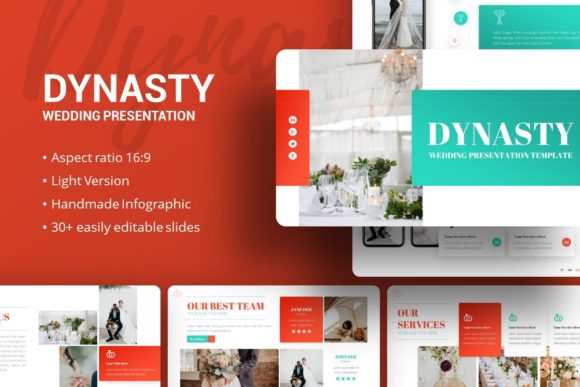
The technical backbone of any presentation template determines its longevity and ease of use. Dynasty is built upon a Master Slide architecture, which is the single most important feature for maintaining consistency across 35 unique slides. Instead of formatting individual elements on every page, users can adjust global styles—such as typography, color palettes, and logo placement—from a central control panel. This ensures that whether you are presenting a quarterly financial report or a creative mood board, the visual language remains cohesive throughout the deck.
Beyond structural integrity, the template includes handcrafted infographics designed specifically within PowerPoint. Unlike generic charts imported from external software, these vector-based graphics are fully editable natively. You can resize, recolor, and reshape data visualizations without losing pixel perfection. This capability transforms abstract data into digestible stories. The inclusion of drag-and-drop picture placeholders further streamlines the workflow, allowing creators to swap preview images with their own assets instantly while maintaining aspect ratios and masking effects.
Adapting Dynasty for Business and Corporate Narratives
In the corporate sector, clarity often competes with engagement. Dynasty resolves this tension by providing layouts that organize complex information without appearing sterile. For company profiles and pitch decks, the template’s structured grids allow for hierarchical data presentation. A startup founder can utilize the infographic slides to illustrate market growth or user acquisition funnels, turning dry statistics into visual evidence of viability. The clean lines and ample whitespace inherent in the design prevent cognitive overload during high-stakes investor meetings.
Creative agencies and marketing teams can leverage the same framework to showcase portfolios. The key adaptation here involves utilizing the image-heavy layouts to let client work take center stage while using the typographic slides for case study context. Because all graphic elements are resizable and editable, an agency can subtly shift the accent colors to match a specific client’s branding for each pitch, making the presentation feel tailor-made rather than recycled. This level of customization demonstrates attention to detail, reinforcing the agency's value proposition before a single word is spoken.
Elevating Personal Portfolios and Creative Projects
For freelancers, photographers, and educators, a presentation often serves as a digital extension of their personal brand. Dynasty’s aesthetic versatility makes it particularly effective for personal portfolios where tone matters as much as content. Photographers can use the full-bleed image slides to create immersive galleries, interspersed with minimalist text slides that provide artistic statements or project background. The template’s elegant styling complements visual art without competing for attention, acting as a digital frame rather than a distraction.
Educators and workshop leaders can repurpose the template’s modular layout for instructional design. The handcrafted infographics are ideal for breaking down complex theories or historical timelines into memorable visual chunks. By organizing content into distinct, visually consistent segments, presenters can guide learners through dense material more effectively. The ability to edit vector icons means instructors can create custom visual metaphors that align specifically with their curriculum, enhancing retention and engagement in ways that standard bullet points cannot achieve.
Specialized Application: Wedding and Event Planning
While versatile enough for business, Dynasty also excels in personal celebrations through its dedicated Wedding Presentation variation. Event planning requires a unique blend of logistical precision and emotional resonance. This template facilitates vendor coordination, timeline visualization, and mood boarding in a format that feels celebratory yet organized. Planners can use the infographic slides to map out seating arrangements or budget allocations, transforming stressful logistics into clear, manageable visuals.
For couples creating their own wedding decks to share with family or vendors, the template offers a polished alternative to scattered emails and Pinterest boards. The picture placeholders allow for easy integration of venue photos, floral inspiration, and attire selections. Because the design is grounded and elegant, it avoids the overly cutesy aesthetic common in wedding stationery, appealing to adults who want their event planning to reflect maturity and style. The result is a functional tool that enhances communication while setting the visual tone for the occasion itself.
Practical Workflow and Asset Management
Maximizing the value of Presentation Template - Dynasty requires understanding the included file ecosystem. The package contains the .PPTX file, comprehensive documentation, and a vector icon set. Users should begin by reviewing the documentation to understand the master slide relationships before making extensive edits. This upfront investment of time prevents frustration later and ensures that global changes propagate correctly. The vector icon set is a critical resource; having access to scalable, editable icons within the same design language eliminates the need to source mismatched graphics from third-party sites.
It is vital to note that demo images are for preview purposes only and are not included in the downloadable files. This distinction encourages users to populate the template with original, high-quality assets relevant to their specific narrative. Relying on stock photography provided in templates often leads to generic results. By sourcing your own imagery, you ensure the final output is authentic and legally cleared for your intended use. When replacing placeholders, always check resolution and lighting consistency to maintain the professional polish that Dynasty establishes.
Maintaining Visual Consistency and Impact
The greatest risk when using a feature-rich template like Dynasty is over-customization. Just because every element is editable does not mean every element should be changed. Effective design relies on restraint. Select a limited color palette derived from your brand or project theme and apply it consistently across all 35 slides. Resist the urge to use different fonts or effects on each page; instead, rely on layout variation to create rhythm and interest. The template’s strength lies in its unified system, and deviating too far from that system undermines its professional impact.
Consider the viewing context when finalizing your deck. Dynasty’s pixel-perfect illustrations scale beautifully for large screens, but text hierarchy must remain legible on smaller devices if the presentation will be shared digitally. Test your customized version at various zoom levels to ensure readability. Additionally, when adapting the template for different audiences, focus on content density. A pitch deck for investors may require data-dense infographic slides, while a portfolio review might benefit from stripping back text entirely. Use the template’s flexibility to serve the audience’s needs, not just to showcase design capabilities.
Ultimately, Presentation Template - Dynasty functions as a collaborative partner in the storytelling process. It removes the friction of starting from scratch while providing enough structural guidance to keep presentations focused and effective. Whether you are securing funding, showcasing creative work, teaching a class, or planning a life event, the template offers a reliable vessel for your ideas. By combining technical robustness with aesthetic sophistication, it empowers users to communicate with confidence and clarity, proving that great design is less about decoration and more about purposeful communication.