Evaluating the Toasty Google Slides Template for Culinary and Business Presentations
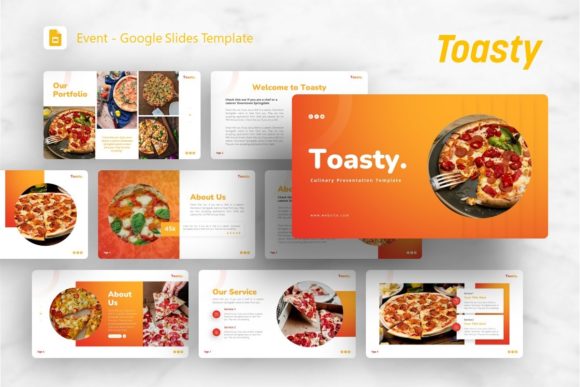
Selecting the right presentation framework is a critical step in communicating ideas effectively, particularly for professionals in creative, culinary, or startup environments. The Google Slides Template - Toasty is designed to address specific visual and structural needs within these sectors. While originally conceptualized with a culinary focus, its architecture supports a broader range of applications including creative agency profiles, corporate business decks, photography portfolios, and pitch decks. Understanding the functional capabilities and limitations of this template allows users to determine if it aligns with their specific presentation goals before committing to customization.
Core Functionality and Design Architecture
The Toasty template distinguishes itself through a combination of aesthetic warmth and structural flexibility. At its foundation, the template includes 36 unique slides per variation, providing a comprehensive library of layouts without excessive redundancy. This volume is significant because it offers enough variety to construct a complete narrative arc—from introduction and problem statement to solution, portfolio showcase, and conclusion—without requiring users to design custom slides from scratch.
A primary technical feature is the use of Master Slides. For users evaluating efficiency, this is a crucial consideration. Changes made to a Master Slide propagate across all associated slides, ensuring global consistency in fonts, colors, and logo placement. This reduces the time spent on formatting maintenance and minimizes the risk of visual inconsistencies during last-minute edits. Furthermore, the template utilizes handcrafted infographics and pixel-perfect illustrations that are fully editable within PowerPoint. This means data visualization elements are not static images; they can be modified to reflect accurate metrics and branding without needing external graphic design software.
The inclusion of drag-and-drop picture placeholders streamlines the workflow for photography-heavy presentations. Users can replace preview images instantly while maintaining aspect ratios and masking effects. This functionality is essential for portfolios and culinary presentations where visual fidelity directly impacts audience perception.
Suitable Use Cases and Audience Fit
Evaluating whether the Google Slides Template - Toasty is appropriate requires matching its design language to the intended message. The template excels in scenarios where visual storytelling and approachability are paramount.
- Culinary and Hospitality: As suggested by the name, the color palette and layout hierarchy support food photography, menu presentations, and restaurant business plans. The warm tones evoke appetite and comfort, which aligns with industry expectations.
- Creative Agencies and Portfolios: The grid-based layouts and ample whitespace allow creative work to take center stage. For photographers and designers, the template acts as a neutral but polished frame that enhances rather than distracts from the featured content.
- Startups and Pitch Decks: With dedicated slides for team introductions, financial projections, and product showcases, Toasty provides the necessary scaffolding for investor communications. The infographic capabilities allow founders to visualize market data clearly.
- Corporate Profiles: While warmer than traditional corporate blue templates, Toasty works well for businesses aiming to project a modern, human-centric brand identity. It is suitable for internal culture decks, sustainability reports, or client-facing proposals where connection matters more than rigid formality.
Benefits and Practical Advantages
From a practical standpoint, the primary benefit of adopting this template is the reduction of design overhead. Creating 36 cohesive, professionally designed slides typically requires dozens of hours of design work or significant budget allocation. Toasty compresses this timeline, allowing users to focus on content strategy and delivery.
The vector icon set included in the files adds another layer of utility. Icons serve as visual anchors that improve information retention and break up text-heavy slides. Having a matched set ensures that the visual style remains consistent throughout the deck, avoiding the disjointed look that often results from sourcing free icons from disparate websites.
Additionally, the documentation file serves as an operational manual. For teams with varying levels of design proficiency, this resource lowers the barrier to entry. It ensures that junior staff or non-designers can utilize the template correctly, maintaining brand standards even when the primary designer is unavailable.
Tradeoffs and Considerations
Despite its versatility, the Google Slides Template - Toasty is not a universal solution. Objective evaluation requires acknowledging potential friction points.
Aesthetic Specificity: The "Toasty" theme implies a specific color temperature and mood. Organizations with strict, cool-toned, or highly minimalist brand guidelines may find the base aesthetic requires significant reworking. While colors are editable, changing the fundamental vibe of a template can sometimes be more labor-intensive than selecting a neutral alternative.
Preview vs. Reality: A critical expectation management point involves imagery. All images in the demo are for preview purposes only and are not included in the downloadable files. Users must have their own high-quality assets ready. If a user lacks professional photography, the template may look less effective than anticipated. The quality of the final output is heavily dependent on the quality of the user-supplied content.
Platform Nuances: Although marketed as a Google Slides template, the description highlights PowerPoint (.PPTX) files and Master Slides. While PPTX files generally convert well to Google Slides, complex animations, specific font renderings, or intricate master slide relationships can occasionally experience compatibility shifts. Users committed exclusively to the Google Workspace ecosystem should test the conversion immediately upon download to ensure all editable elements function as expected.
Learning Curve: While customizable, "easy" is relative. Users unfamiliar with editing Master Slides or manipulating vector shapes in PowerPoint/Slides may initially struggle to unlock the full potential of the template. The learning curve is lower than designing from scratch but higher than using a basic text-only theme.
Decision-Making Framework
To determine if this template is the right investment, consider the following decision matrix:
- Assess Content Volume: Do you need between 20 and 36 slides? If your presentation is significantly shorter, a lighter template may suffice. If longer, verify that the existing styles can be replicated easily.
- Evaluate Asset Readiness: Do you possess high-resolution images and finalized data? If you are still in the early brainstorming phase without visual assets, prioritize content creation before purchasing a visually driven template like Toasty.
- Check Brand Alignment: Does your brand allow for warm, illustrative, and slightly informal aesthetics? If your sector demands clinical precision or extreme conservatism, explore alternatives with stricter geometric structures.
- Verify Technical Environment: Confirm that your organization’s software version supports the included .PPTX features. Test the master slide functionality in your specific environment before beginning heavy customization.
Ultimately, the Google Slides Template - Toasty represents a balance between specialized aesthetic appeal and general-purpose utility. It is best suited for users who value visual warmth and structured storytelling over sterile minimalism. By understanding both its robust feature set and its inherent constraints, professionals can leverage this tool to create compelling presentations efficiently, provided they enter the process with realistic expectations regarding asset requirements and platform compatibility.