Healthster: A Versatile Google Slides Template
Creating a compelling presentation often feels like a balancing act between aesthetic appeal and clear communication. For professionals in the wellness sector, educators, or creative agencies, finding a design that speaks to mental health without feeling clinical or overly sterile is a common challenge. The Google Slides Template - Healthster addresses this specific need by offering a clean, empathetic, and highly functional design framework. While its name suggests a focus on healthcare, its underlying structure makes it a surprisingly adaptable tool for a wide range of personal and professional projects.
At its core, Healthster is more than just a collection of pretty slides; it is a comprehensive visual system designed to save time while elevating your message. Whether you are preparing a pitch deck for a mental health startup, updating a corporate company profile, or showcasing a photography portfolio, this template provides the foundational elements necessary to look polished and professional. It bridges the gap between specialized medical presentations and general business storytelling, making it an excellent choice for users who value both form and function.
Beyond Mental Health: Unexpected Use Cases
Although introduced as a mental health resource, the versatility of the Google Slides Template - Healthster is one of its strongest assets. The design language is neutral enough to support various narratives while retaining a sense of warmth and trustworthiness. This flexibility allows users from different industries to adapt the template to their specific goals without starting from scratch.
- Creative Agencies and Portfolios: The minimalist layout and ample whitespace make it ideal for displaying visual work. Photographers and designers can utilize the picture placeholders to create stunning galleries that do not compete with the artwork itself.
- Startup Pitch Decks: Investors respond well to clarity. The included infographic slides help entrepreneurs explain complex business models or market data in a digestible format, which is crucial when seeking funding for wellness tech or lifestyle brands.
- Corporate Profiles: Human resources teams and internal communicators can use the template for employee wellness programs, diversity and inclusion workshops, or annual reports that require a softer, more people-centric tone than standard corporate decks.
- Educational Content: Teachers and trainers discussing psychology, sociology, or health sciences will find the handcrafted illustrations helpful for breaking down academic concepts into engaging visual lessons.
By viewing this template as a flexible canvas rather than a rigid medical form, users can unlock significant value across diverse contexts. The key lies in leveraging the existing master slides to maintain consistency while swapping out content to fit your unique narrative.
Key Features That Streamline Your Workflow
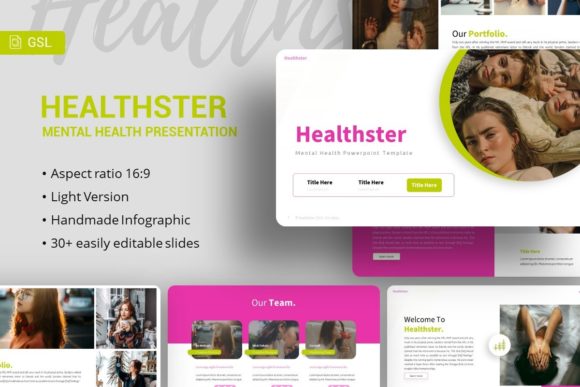
Time is often the most scarce resource for freelancers, marketers, and small business owners. The primary appeal of introducing Healthster into your workflow is the reduction of design friction. Instead of spending hours aligning text boxes or searching for matching icons, you can focus entirely on refining your message. The template includes 35 distinct slides, providing enough variety to handle almost any presentation length without becoming repetitive.
A standout feature is the reliance on Master Slides. For beginners or those less familiar with advanced design software, this is a game-changer. Changes made to a master slide automatically propagate to all associated slides, ensuring global consistency in fonts, colors, and logo placement. This prevents the common issue of mismatched formatting that often plagues hastily assembled presentations. Furthermore, all graphics are fully resizable and editable. You are not locked into static images; you can adjust charts, diagrams, and illustrations to match your specific data points or branding guidelines.
The inclusion of pixel-perfect illustrations and vector icons adds a layer of professional polish that is difficult to achieve with free stock assets. These elements are designed to work harmoniously within the template’s color palette, ensuring that every slide looks cohesive. Additionally, the drag-and-drop picture placeholders simplify the process of adding custom imagery, allowing you to visualize your final product quickly during the drafting phase.
Understanding File Compatibility and Assets
Before downloading or purchasing, it is important to understand exactly what is included to ensure compatibility with your current tools. While marketed as a Google Slides template, the primary source file provided is a PowerPoint .PPTX file. Fortunately, Google Slides handles .PPTX imports exceptionally well, preserving most formatting and editability. However, users should be aware that some complex animations or specific font renderings may shift slightly during conversion. Testing the import process early in your project timeline is always a smart move.
The package also includes a documentation file and a set of vector icons. The documentation serves as a user manual, guiding you through customization options and troubleshooting common issues. This support material is particularly valuable for beginners who may feel intimidated by master slide editing. The vector icons are a bonus asset library that extends the template's utility beyond the initial 35 slides, allowing you to build custom layouts that still feel native to the Healthster aesthetic.
Please note: All images shown in the demo preview are for illustrative purposes only and are not included in the downloadable files. This is a standard practice in template distribution due to licensing restrictions. Users must supply their own photography and visuals. While this requires an extra step, it ultimately ensures that your presentation remains authentic to your brand and avoids potential copyright issues associated with bundled stock photos.
Practical Considerations Before You Begin
Choosing the right template involves more than just liking the color scheme. To get the most out of the Google Slides Template - Healthster, consider the tone of your content. The design leans towards calm, organized, and supportive visuals. If your presentation requires aggressive sales tactics, high-contrast neon aesthetics, or dense technical schematics, this particular style might create cognitive dissonance for your audience. It excels in environments where empathy, clarity, and human connection are paramount.
Additionally, assess your comfort level with customization. While the template is marketed as easy to customize, maximizing its potential does require a basic understanding of slide masters and vector editing. Beginners should allocate time to read the included documentation or watch tutorials on editing master slides in their preferred platform. Skipping this learning curve can lead to frustration when trying to make global changes. Conversely, experienced designers will appreciate the clean hierarchy and well-organized layers, which allow for rapid iteration and deep customization without fighting against messy formatting.
Finally, think about longevity. Trends in mental health and wellness design evolve, but the fundamental principles of good information architecture remain constant. Healthster focuses on readability and structural integrity over fleeting decorative trends. This makes it a sustainable choice for organizations that plan to update their decks regularly. By investing time in mastering this template now, you build a reusable asset that can serve your personal portfolio, business pitches, or educational materials for years to come.
Making the Final Decision
Ultimately, the Google Slides Template - Healthster represents a thoughtful intersection of niche specificity and broad utility. It solves the immediate problem of needing a professional mental health presentation while offering enough flexibility to serve as a go-to resource for creative and corporate tasks. By understanding its features, respecting its intended aesthetic, and properly managing the file assets, users can transform a simple template download into a powerful communication tool. Whether you are launching a startup, teaching a class, or refreshing your agency’s portfolio, this template provides the solid foundation needed to present your ideas with confidence and care.